3D School Treats Box Laser Cut: Creative Digital Design
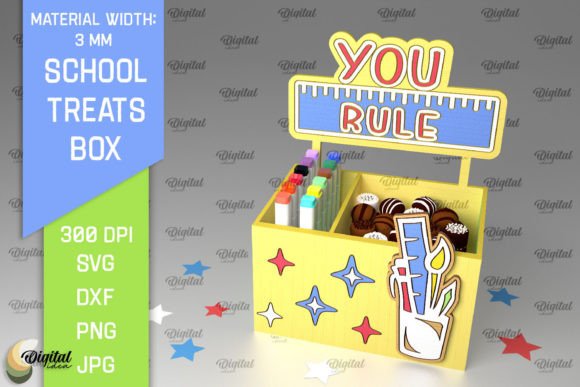
Unleash your creativity and craft stunning, dimensional projects with the versatile 3D School Treats Box Laser Cut design template. This digital asset is a fantastic starting point for anyone looking to create personalized party favors, unique packaging, or memorable classroom gifts with a professional, polished look. The intricate laser-cut design offers a beautiful, tactile quality that elevates simple materials into something truly special.
Imagine presenting homemade cookies, small toys, or thank-you notes in a box that itself is part of the gift. This template makes that possible. It’s perfect for teachers organizing end-of-year celebrations, parents preparing for school events, or crafters designing for seasonal markets. The design’s charm lies in its detail and the satisfying result of assembling a 3D object from a flat digital file.
What's Included and How to Use It
Your purchase provides a comprehensive digital download. You will receive a zip folder containing the 3D School Treats Box design in multiple, widely compatible file formats: SVG, DXF, EPS, PDF, JPG, and PNG. This ensures you can use the design with a variety of cutting machines (like Cricut or Silhouette) and graphic design software (such as Adobe Illustrator, Inkscape, or CorelDRAW).
The design is optimized for materials with a width of 3mm, making it ideal for cardstock, thin wood, acrylic, or craft foam. The assembly is straightforward, and the result is a sturdy, eye-catching container. This design asset is more than just a template; it’s a gateway to endless project possibilities.
Endless Creative Applications
The true value of a well-crafted design file like this is its flexibility. While it’s perfect for school-themed treats, its applications extend far beyond. Consider using the design as a starting point for:
- Party Favors: Customize for birthdays, holidays, or wedding favors by changing the material color or adding personalized tags.
- Home Decor: Create decorative boxes for shelves or use the design elements as part of larger wall art projects.
- Stationery and Packaging: Adapt the design for unique gift card holders or product packaging for small businesses.
- Textile and Tableware: Use the shape as a stencil or pattern for fabric projects or engraved tableware.
- Digital Design: Incorporate the vector elements into social media graphics, poster designs, or website visuals for a playful, tactile feel.
Tips for Choosing and Using Your Design
When selecting a digital design asset, especially for laser cutting, a few considerations will ensure success. Always check the recommended material thickness—in this case, 3mm—to match your intended medium. Review the file formats provided to confirm compatibility with your software and equipment.
Think about the mood of your project. This design has a friendly, approachable aesthetic, making it ideal for celebratory and educational contexts. For a more formal look, you might pair it with elegant typography or use it on premium cardstock. Testing a small prototype cut is always a wise step to calibrate your machine settings before committing to your final material.
The right design template can dramatically improve the visual consistency and professional presentation of your projects. It saves time, provides a reliable structure, and sparks new ideas. Whether you’re a seasoned crafter or just starting, having a high-quality asset like the 3D School Treats Box Laser Cut in your library empowers you to produce beautiful, tangible creations that delight and impress.